

One of the ways to test the SMTP Communication of your email server is by using Telnet. But…
What is Telnet?
Telnet is a protocol or a language used to talk to computers and other machines
Telnet Client allows a computer to connect to a remote Telnet server and run applications on that server. Once logged on, a user is given a command prompt that can be used as if it had been opened locally on the Telnet server’s console.
How to Test the SMTP Communication of email server is by using Telnet
We are going to show you how you can use Telnet to test SMTP communication of your email server.
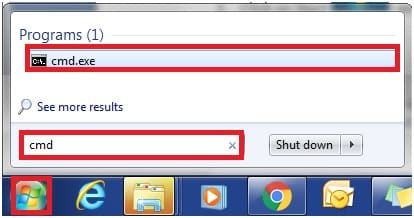
- Click on Start and type in cmd to go into the command prompt
- In the command prompt type telnet and press ENTER

- In the Telnet, Type o <your mail server domain> 25 and press ENTER

- Type EHLO <your mail server domain>, and press ENTER

- Type AUTH LOGIN and press ENTER
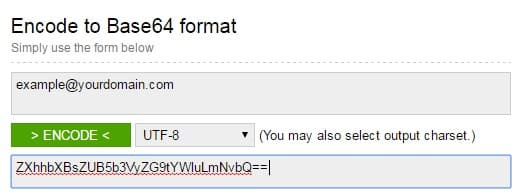
- Enter your user name encrypted in base 64 and press ENTER
- Enter your password encrypted in base 64 and press ENTER
- Type MAIL FROM: <your email address> and press ENTER
- Type RCPT TO: <your target email address> and press ENTER
- Type DATA and press Enter
- Type a test message and press ENTER, example “Test Email.”, press ENTER, type “.” and press ENTER again to end the message.
Here how it should look like
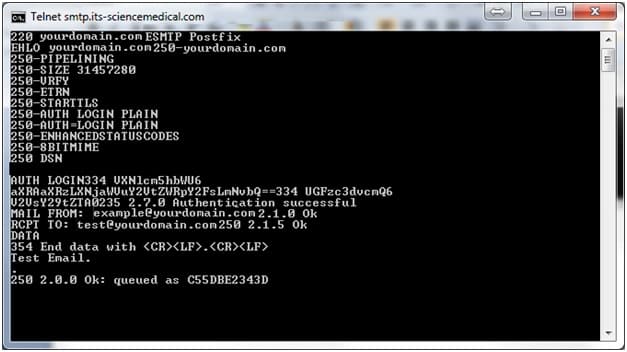

You should receive an email like this

Congratulations your email server is working fine.